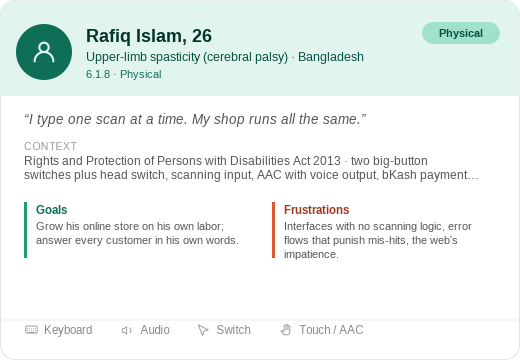
Rafiq Islam
Upper-limb spasticity (cerebral palsy)
Bangladesh · South Asia · Age 26
- Law
- Rights & Protection of PWD Act 2013
- Services
- bKash / MyGov BD
- Messaging
- WhatsApp · imo
Assistive Technology
- Keyboard
- Audio
- Switch
- Touch / AAC
I type one scan at a time. My shop runs all the same.
Goals
Grow his online store on his own labor; answer every customer in his own words.
Frustrations
Interfaces with no scanning logic, error flows that punish mis-hits, the web's impatience.
Profile
Rafiq Islam has spastic cerebral palsy, with involuntary muscle movement and spasticity. Even so, he runs an online shop and lives independently. He skillfully uses a switch interface and special software to work on a computer.
Technology Environment
- Input: two big-button switches, a head switch
- Keyboard: keyguard fitted, slow-keys enabled
- Software: scanning input, predictive text
- Communication: AAC software with voice output
Daily Scenario
At 10 a.m. Rafiq checks orders for his online shop. Using a mouse is hard, so he uses switch scanning: items highlight in sequence and he presses the switch on the one he wants. Slow, but accurate.
// Rafiq's switch-scanning config
const switchScanningConfig = {
  scanPattern: 'row-column',   // rows first, then columns
  scanSpeed: 1500,             // next item every 1.5s
  switches: {
    switch1: 'select',
    switch2: 'next',
    headSwitch: 'back'
  },
  feedback: {
    visual: { highlightColor: '#FFD700', highlightWidth: 4, dimUnselected: true },
    audio: { scanSound: 'beep.wav', selectSound: 'chime.wav' }
  },
  prediction: { enabled: true, wordPrediction: true, phrasePrediction: true, learningMode: true },
  dwellClick: { enabled: true, delay: 2000, showProgress: true }
};
He has to write product descriptions. On an ordinary keyboard, involuntary movements make him hit neighboring keys. Rafiq uses an on-screen keyboard with scanning input: to type a letter he selects the letter group, then the letter. It takes about 20 seconds per character, but he can enter it accurately.
In the afternoon a customer calls. Speaking is also hard, so Rafiq uses AAC software—quickly selecting pre-saved sentences, or composing new ones to output by voice: "Hello, this is Rafiq's shop. How can I help you?"
# Rafiq's daily efficiency strategy
daily_workflow = {
    'order_check': {
        'method': 'auto-sort + filter',
        'shortcuts': ['new orders', 'ready to ship', 'inquiries'],
        'time_saved': '70%'
    },
    'product_listing': {
        'method': 'template + autocomplete',
        'tools': ['bulk image upload', 'description template', 'price calculator'],
        'efficiency': 'input time cut 50%'
    },
    'customer_service': {
        'method': 'AAC + chatbot',
        'preset_messages': [
            'Your order is confirmed.',
            'It ships today.',
            'I can help with an exchange or refund.'
        ],
        'response_time': 'under 5 min'
    }
}
In the evening, Rafiq tests a new AAC app. Its AI prediction suggests whole sentences from just the first few letters, cutting a 30-minute email down to 10. For Rafiq, advancing technology means greater independence.
Challenges & Strategies
- Involuntary movement: unintended muscle motion causes frequent input errors. Rafiq tunes switch sensitivity and adds confirmation steps.
- Slow input: a single sentence can take minutes. He makes maximum use of templates, macros, and predictive text.
- Fatigue: concentrating to operate switches tires him quickly. He breaks work into small units and rests often.
Design Implications
- Scan-friendly UI: logical order, grouped options.
- Error tolerance: easy recovery from mistakes.
- Efficiency tools: autocomplete, templates, frequent-item access.
- Multiple modes: support several input methods at once.